How to Make a Raindance AI Video from Two Photos
Choose your two photos, pick the singer, and make a 15-second Raindance video with Vibopop. See the actual inputs and outputs before you start.
You can make a Raindance video with two separate portraits. One person sings and gets the close-ups; the other takes the partner role. The finished video is a 15-second, landscape 4:3 MP4 with sound.
Start with the Raindance examples. These are reference examples from raindanceai.org, labelled with their source, not Vibopop test results. These examples are not customer testimonials.
1. Choose someone to make it with
An anniversary message, a surprise for your partner, or a music-video moment with a friend gives the clip a purpose. The template includes close, affectionate poses on the beach. Watch the sample first and choose a pairing that is comfortable with that performance.
You do not need to take a new photo together. Use one separate photo of each adult, with their permission.
2. Choose two clear photos
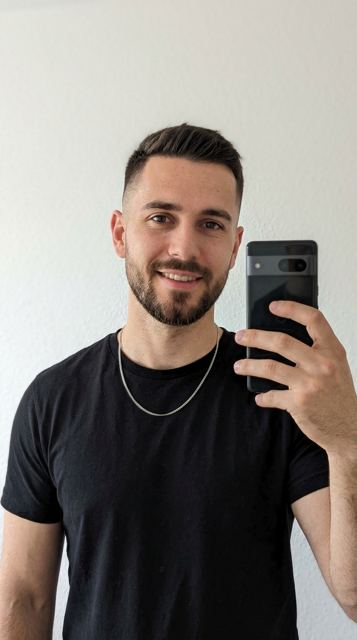
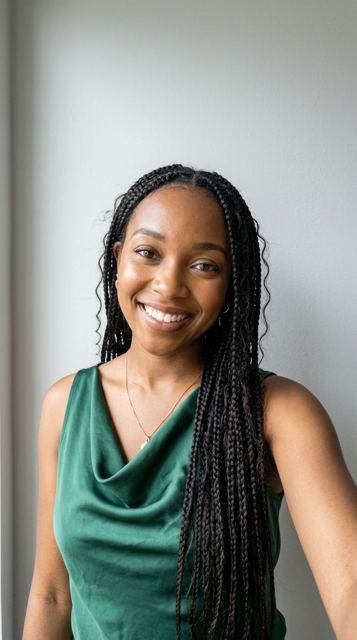
- Put one person in each photo, facing roughly toward the camera.
- Keep the face, hair and shoulders clearly visible in even light.
- Avoid sunglasses, hands over the face, group shots and very small faces.
- Choose clothes you want to see in the video. The model is asked to preserve the outfit as well as the face and hair.
These are the two input portraits shown with the source site’s couple example:
3. Open the template and pick the singer
Open the Raindance template, choose Make our Raindance video, and sign in. The studio keeps Raindance selected. Upload photo 1 and photo 2.
Photo 2 sings by default. Choose photo 1 instead if you want that person to get the singing close-ups. This changes the role assignment; you do not need to upload the photos again. It does not select a custom voice.
4. Check the cost and generate
Choose 480p for 20 credits or 720p for 45 credits. Both produce a 15-second video. The credit balance and generation cost are shown before you submit. Credit packs are available without a subscription.
Submit once. You can leave the studio while it processes and return to your works later. A job marked failed automatically returns its generation credits; a job still processing has not failed.
5. Review the result before posting
Check both people after each cut, especially the face, hair and clothing. Also check hands, mouth movements and sound. Generation varies, and lip sync is not guaranteed to match every word.
Below is raindanceai.org’s result from those photos, shown as a reference example:
Download the MP4 from your completed work. Keep the landscape frame if you want to retain both people and the scene. When you post to a social app, identify it as AI-generated and choose a caption that makes the clip yours: an anniversary, a shared joke, or a note to the person in it.
What this template can and cannot change
You choose the two portraits, singer and output resolution. The scene and performance come from the template; there is no custom scene prompt in this flow. The reference examples explain the scene and roles. Vibopop results may differ, especially with different photos.
Compare all three photo-and-video examples before choosing your pair.